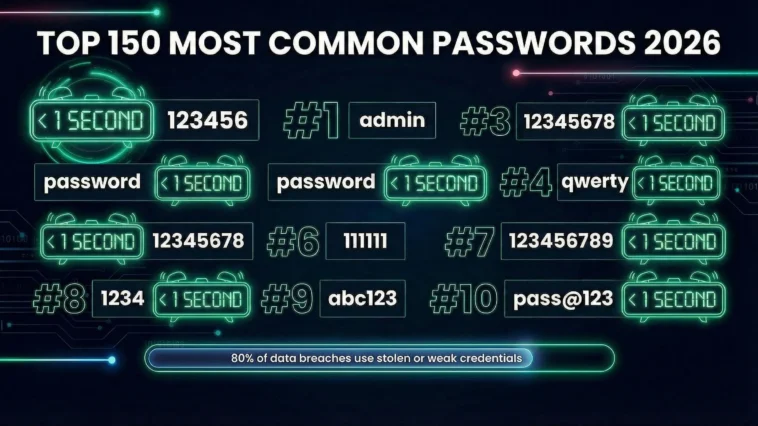
2 billion passwords were leaked in 2025. Over 7.6 million of them were "123456".
After years of working with UK organisations on security, I keep seeing the same thing: people use weak passwords that hackers crack in under a second. Despite every warning, every breach headline, every "please create a stronger password" prompt.
This list shows the 150 most common passwords 2026, drawn from real breach data. You will see exactly what attackers look for first, why we keep making the same mistakes, and how to actually protect your accounts.
Key Findings from 2 Billion Leaked Passwords (November 2025)
38.6% of all passwords analysed contain the string "123"
65.8% have fewer than 12 characters
Under 1 second to crack every password in the top 50 on this list
Only 6% of passwords in breach data were actually unique
Source: Comparitech analysis of 2 billion leaked credentials, November 2025
The 150 Most Common Passwords 2026
Scroll through this list. If you recognise any of your passwords here, change them today. Every single one of these can be cracked in under a second.
| Rank | Password | Crack Time |
|---|---|---|
| 1 | 123456 | <1 second |
| 2 | 12345678 | <1 second |
| 3 | 123456789 | <1 second |
| 4 | admin | <1 second |
| 5 | 1234 | <1 second |
| 6 | Aa123456 | <1 second |
| 7 | 12345 | <1 second |
| 8 | password | <1 second |
| 9 | 123 | <1 second |
| 10 | 1234567890 | <1 second |
| 11 | qwerty | <1 second |
| 12 | qwerty123 | <1 second |
| 13 | Aa@123456 | <1 second |
| 14 | 1234567 | <1 second |
| 15 | Password | <1 second |
| 16 | P@ssw0rd | <1 second |
| 17 | admin123 | <1 second |
| 18 | 111111 | <1 second |
| 19 | Pass@123 | <1 second |
| 20 | 123123 | <1 second |
| 21 | welcome | <1 second |
| 22 | 1q2w3e4r | <1 second |
| 23 | abc123 | <1 second |
| 24 | Admin@123 | <1 second |
| 25 | iloveyou | <1 second |
| 26 | 000000 | <1 second |
| 27 | password1 | <1 second |
| 28 | qwerty1 | <1 second |
| 29 | Abcd@1234 | <1 second |
| 30 | dragon | <1 second |
| 31 | monkey | <1 second |
| 32 | letmein | <1 second |
| 33 | 1q2w3e4r5t | <1 second |
| 34 | qwertyuiop | <1 second |
| 35 | ******** | <1 second |
| 36 | secret | <1 second |
| 37 | password123 | <1 second |
| 38 | football | <1 second |
| 39 | shadow | <1 second |
| 40 | sunshine | <1 second |
| 41 | princess | <1 second |
| 42 | master | <1 second |
| 43 | michael | <1 second |
| 44 | ashley | <1 second |
| 45 | charlie | <1 second |
| 46 | 1qaz2wsx | <1 second |
| 47 | asdfghjkl | <1 second |
| 48 | zxcvbnm | <1 second |
| 49 | 654321 | <1 second |
| 50 | 666666 | <1 second |
| 51 | superman | <1 second |
| 52 | batman | <1 second |
| 53 | India@123 | <1 second |
| 54 | trustno1 | <1 second |
| 55 | hello | <1 second |
| 56 | love | <1 second |
| 57 | whatever | <1 second |
| 58 | donald | <1 second |
| 59 | liverpool | <1 second |
| 60 | arsenal | <1 second |
| 61 | chelsea | <1 second |
| 62 | jordan | <1 second |
| 63 | nicole | <1 second |
| 64 | taylor | <1 second |
| 65 | access | <1 second |
| 66 | thomas | <1 second |
| 67 | buster | <1 second |
| 68 | hockey | <1 second |
| 69 | hunter | <1 second |
| 70 | soccer | <1 second |
| 71 | ranger | <1 second |
| 72 | andrew | <1 second |
| 73 | harley | <1 second |
| 74 | tigger | <1 second |
| 75 | joshua | <1 second |
| 76 | starwars | <1 second |
| 77 | matthew | <1 second |
| 78 | george | <1 second |
| 79 | summer | <1 second |
| 80 | friday | <1 second |
| 81 | cheese | <1 second |
| 82 | cookie | <1 second |
| 83 | coffee | <1 second |
| 84 | pepper | <1 second |
| 85 | guitar | <1 second |
| 86 | chicken | <1 second |
| 87 | ginger | <1 second |
| 88 | maggie | <1 second |
| 89 | jessica | <1 second |
| 90 | jennifer | <1 second |
| 91 | amanda | <1 second |
| 92 | Robert | <1 second |
| 93 | daniel | <1 second |
| 94 | william | <1 second |
| 95 | maria | <1 second |
| 96 | veronica | <1 second |
| 97 | susana | <1 second |
| 98 | skibidi | <1 second |
| 99 | minecraft | <1 second |
| 100 | Minecraft | <1 second |
| 101 | fortnite | <1 second |
| 102 | roblox | <1 second |
| 103 | warcraft | <1 second |
| 104 | newmember | <1 second |
| 105 | newuser | <1 second |
| 106 | newpass | <1 second |
| 107 | temppass | <1 second |
| 108 | test | <1 second |
| 109 | test123 | <1 second |
| 110 | guest | <1 second |
| 111 | root | <1 second |
| 112 | pass | <1 second |
| 113 | passw0rd | <1 second |
| 114 | Password1 | <1 second |
| 115 | Password123 | <1 second |
| 116 | eminem | <1 second |
| 117 | 50cent | <1 second |
| 118 | metallica | <1 second |
| 119 | slipknot | <1 second |
| 120 | blink182 | <1 second |
| 121 | spiderman | <1 second |
| 122 | hellokitty | <1 second |
| 123 | barbie | <1 second |
| 124 | mario | <1 second |
| 125 | joker | <1 second |
| 126 | thor | <1 second |
| 127 | elsa | <1 second |
| 128 | 987654321 | <1 second |
| 129 | 147258369 | <1 second |
| 130 | 112233 | <1 second |
| 131 | 121212 | <1 second |
| 132 | 131313 | <1 second |
| 133 | 696969 | <1 second |
| 134 | 777777 | <1 second |
| 135 | 888888 | <1 second |
| 136 | 999999 | <1 second |
| 137 | aaaaaa | <1 second |
| 138 | qqqqqq | <1 second |
| 139 | london | <1 second |
| 140 | manchester | <1 second |
| 141 | password! | <1 second |
| 142 | qwerty! | <1 second |
| 143 | 123456! | <1 second |
| 144 | computer | <1 second |
| 145 | internet | <1 second |
| 146 | louvre | <1 second |
| 147 | diamond | <1 second |
| 148 | killer | <1 second |
| 149 | yankees | <1 second |
| 150 | lakers | <1 second |
Notice anything? Names, football teams, keyboard patterns, simple number sequences. The same patterns appear year after year.
What Makes These Passwords So Dangerous?
Every password on that list can be cracked in under one second. Not one minute. Not one hour. One second.
Here's why:
Hackers Don't Guess - They Use Lists
Criminals don't sit there typing passwords one by one. They use software that tries millions of passwords per second. And they start with lists just like the one above.
These lists come from previous data breaches. When a company gets hacked, the stolen passwords end up on the dark web. Criminals study them. They know exactly what passwords people choose.
The Maths Is Terrifying
A modern computer can try:
- 10 billion passwords per second using basic hardware
- 100 billion per second with specialist equipment
- 1 trillion per second using cloud computing
At those speeds, a six-character password using only lowercase letters takes 0.02 seconds to crack. Add a capital letter and a number? Still under 5 minutes.
The Real Danger
If you use one of the 150 most common passwords above, you're not just at risk. You're already compromised. These passwords are in every hacker's toolkit.
It's like leaving your front door wide open with a sign saying "Come in."
Password Reuse Makes It Worse
Here's what really scares me. Most people use the same password everywhere.
So when a hacker cracks your password on one site, they try it everywhere else. Your email. Your bank. Your work systems. One weak password can unlock your entire digital life.
Research shows 65% of people reuse passwords across multiple accounts. Criminals know this. They count on it.
Adding "123" Doesn't Help
Think you're clever adding numbers to the end? Everyone does that. Look at the list again:
- password → password1 → password123
- qwerty → qwerty1 → qwerty123
- admin → admin123 → Admin@123
Hackers know these patterns. Their software tries every common variation automatically. Swapping "a" for "@" or "s" for "$"? They test those too.
If your "clever" variation is predictable, it's not secure.
The UK Password Problem
This isn't just a global issue. British businesses and individuals are particularly at risk.
UK Password Statistics 2025
- 23.2 million UK accounts use "123456" as their password
- "Liverpool" and "Arsenal" remain in the UK top 20
- 39% of UK adults use the same password for everything
- 70% have never used a password manager
- UK businesses lose £4.2 billion annually to password-related breaches
Sources: National Cyber Security Centre, Have I Been Pwned, UK Government Cyber Security Breaches Survey 2024
Why Are British Passwords So Predictable?
We love our football clubs. Our pet names. Our children's birthdays. And hackers know it.
The most common UK-specific passwords include:
| Password | Category |
|---|---|
| liverpool | Football club |
| arsenal | Football club |
| chelsea | Football club |
| charlie | Pet name |
| george | Royal/pet name |
| london | City |
| manchester | City |
| qwerty | Keyboard pattern |
Every one of these appears on hacker password lists. If you support Liverpool, hackers already know your password might be "liverpool", "Liverpool1", "LFC2024", or "YNWA".
Small Business Owners: You're a Target
According to the UK Government's Cyber Security Breaches Survey, 50% of businesses experienced a cyber attack in the past year. The most common attack? Password-based.
Small businesses often think they're too small to target. They're wrong. Criminals know small businesses have weaker security. They're easier to break into.
And with Cyber Essentials now requiring strong password policies, there's never been a better time to fix this.
How Different Generations Choose Passwords
Your age says a lot about your password. Researchers analysed millions of leaked passwords and found clear patterns by generation.
The results might make you cringe.
| Generation | Born | Common Passwords | Pattern |
|---|---|---|---|
| Gen Z | 1997-2012 | skibidi, minecraft, roblox, fortnite | Games, memes, internet culture |
| Millennials | 1981-1996 | starwars, pokemon, friends, matrix | 90s pop culture, childhood nostalgia |
| Gen X | 1965-1980 | metallica, nirvana, madonna, prince | Music, bands, celebrities |
| Baby Boomers | 1946-1964 | liverpool, golf, susan, robert | Sports, hobbies, family names |
Gen Z: "Skibidi" Is Now a Security Risk
Yes, really. The word "skibidi" - from the viral internet meme - appeared in thousands of leaked passwords in 2024. So did "rizz", "bussin", and "slay".
Gen Z grew up online. They use internet slang, game names, and meme references as passwords. The problem? Hackers follow internet trends too.
Within weeks of a meme going viral, it appears on hacker password lists.
Millennials: Still Using "Friends" and "Matrix"
If you're between 28 and 43, there's a good chance your password includes a 90s reference. Star Wars. Pokemon. The Matrix. Friends characters like "chandler" and "rachel".
These feel personal. They feel unique. But millions of other millennials had the same childhood.
Gen X and Boomers: Names and Hobbies
Older generations tend to use family names, pet names, and hobbies. "Susan", "robert", "golf", "fishing".
The danger here is social media. Your Facebook profile probably shows your pet's name, your children's names, your anniversary date, and your favourite football team. Hackers check social media first.
The Generational Problem
Every generation thinks their references are unique. They're not. If something was popular enough for you to remember it, millions of others remember it too - including hackers building password lists.
The solution isn't to pick something more obscure. It's to stop using memorable words altogether.
How to Protect Yourself
The good news? Fixing your passwords isn't complicated. Here's what actually works.
1. Use a Password Manager
This is the single best thing you can do. A password manager creates and stores unique, random passwords for every account.
You only need to remember one master password. The manager handles everything else.
Good options include:
- Bitwarden - Free and open source
- 1Password - Great for families and businesses
- Apple Keychain - Built into iPhones and Macs
- Google Password Manager - Built into Chrome
2. Turn On Two-Factor Authentication (2FA)
Even if someone steals your password, they can't get in without the second factor. This is usually a code sent to your phone or generated by an app.
Enable 2FA on your most important accounts first: email, banking, and social media.
3. Make Passwords Long, Not Complicated
Forget the old advice about mixing symbols and numbers. Length beats complexity.
| Password | Time to Crack |
|---|---|
| P@ssw0rd! | 3 hours |
| correcthorsebattery | 550 years |
| correct-horse-battery-staple | Millions of years |
Four random words strung together is stronger than a short password with symbols. And much easier to remember.
4. Check If You've Been Breached
Visit Have I Been Pwned and enter your email address. It will tell you if your details have appeared in any known data breaches.
If you find breaches, change those passwords immediately.
Quick Action Checklist
- Download a password manager today
- Turn on 2FA for your email account
- Check Have I Been Pwned for breaches
- Change any passwords on the 150 list above
- Never reuse passwords between accounts
For Business Owners
If you run a business, password security is even more critical. A single weak password can expose your entire company.
The Cyber Essentials certification now requires:
- Minimum 12-character passwords (or 8 with 2FA)
- Multi-factor authentication on all cloud services
- No default passwords left unchanged
- Technical controls to block weak passwords
Need Help Securing Your Business?
I help UK businesses achieve Cyber Essentials certification and build proper security practices. Let's make sure your passwords aren't the weak link.
Book a Free ConsultationFrequently Asked Questions
Visit Have I Been Pwned and enter your email address. This free service checks your email against billions of leaked records from data breaches. If your email appears, change the passwords for any affected accounts immediately and enable two-factor authentication.
A strong password in 2026 should be at least 14–16 characters long. Length matters more than complexity. Three or four random words joined together — like purple-kettle-Monday-river — is stronger and easier to remember than a short password full of symbols.
The NCSC recommends using three random words as a minimum. Better yet, use a password generator or a password manager to create unique random passwords for every account.
Yes, password managers are significantly safer than reusing passwords or writing them down. They encrypt your passwords with strong encryption that even the password manager company cannot read. The risk of one password manager breach is far lower than the risk of reusing passwords across dozens of sites that could each be breached individually. Choose a reputable manager like Bitwarden, 1Password, or the built-in options from Apple or Google.
The old advice to change passwords every 90 days is outdated. The NCSC and NIST now recommend only changing passwords when there is a specific reason — such as a known breach or if you suspect compromise. Forcing regular changes often leads to weaker passwords as people make small, predictable changes (Password1 becomes Password2). Focus instead on using unique, strong passwords with two-factor authentication enabled.
Two-factor authentication adds a second layer of security beyond your password. After entering your password, you must also provide a second proof of identity — usually a code sent to your phone or generated by an authenticator app. This means even if someone steals your password, they cannot access your account without also having your phone.
Enable 2FA on all important accounts, especially email, banking, and social media. From April 2026, MFA is mandatory for Cyber Essentials certification — so UK businesses need it too, not just individuals.
Despite decades of security awareness, simple passwords persist because humans prioritise convenience over security. We have too many accounts to remember unique passwords for each one. We underestimate the risk because breaches feel abstract until they happen to us. And many systems still allow weak passwords without enforcing minimum requirements. The solution is password managers — they remove the burden of remembering passwords entirely.
Businesses need more than a written password policy — they need technical controls that enforce it. Cyber Essentials v3.3 (April 2026) requires organisations to configure systems so that weak passwords cannot be set, and that MFA is enabled for all accounts with access to sensitive data.
ISO 27001 Annex A also requires documented access control policies backed by technical enforcement. Without these controls, a password policy is just a document — it does not protect you.
Is your business using weak passwords?
A weak password policy is one of the most common reasons businesses fail their Cyber Essentials assessment. From April 2026, MFA is also mandatory. If your team is still using shared passwords or setting their own, you have a gap that needs fixing before it becomes a breach.
I help UK businesses get this right — whether that is through MFA setup and Cyber Essentials certification, or building a full information security framework with ISO 27001.
Book a free security call